 Petal Home
Home / Blog / Countdown App for Family Trips and Big Days
Countdown App for Family Trips and Big Days

A basic countdown tells you how many days are left. Petal Home's Countdowns are built to hold the rest of the occasion too, not just the number.
The quick answer
A useful family countdown should hold the preparation as well as the date. Petal Home Countdowns (Premium) can carry:
- A linked list, reminders and key dates, plus a location, colour and notes, so the whole occasion lives in one place
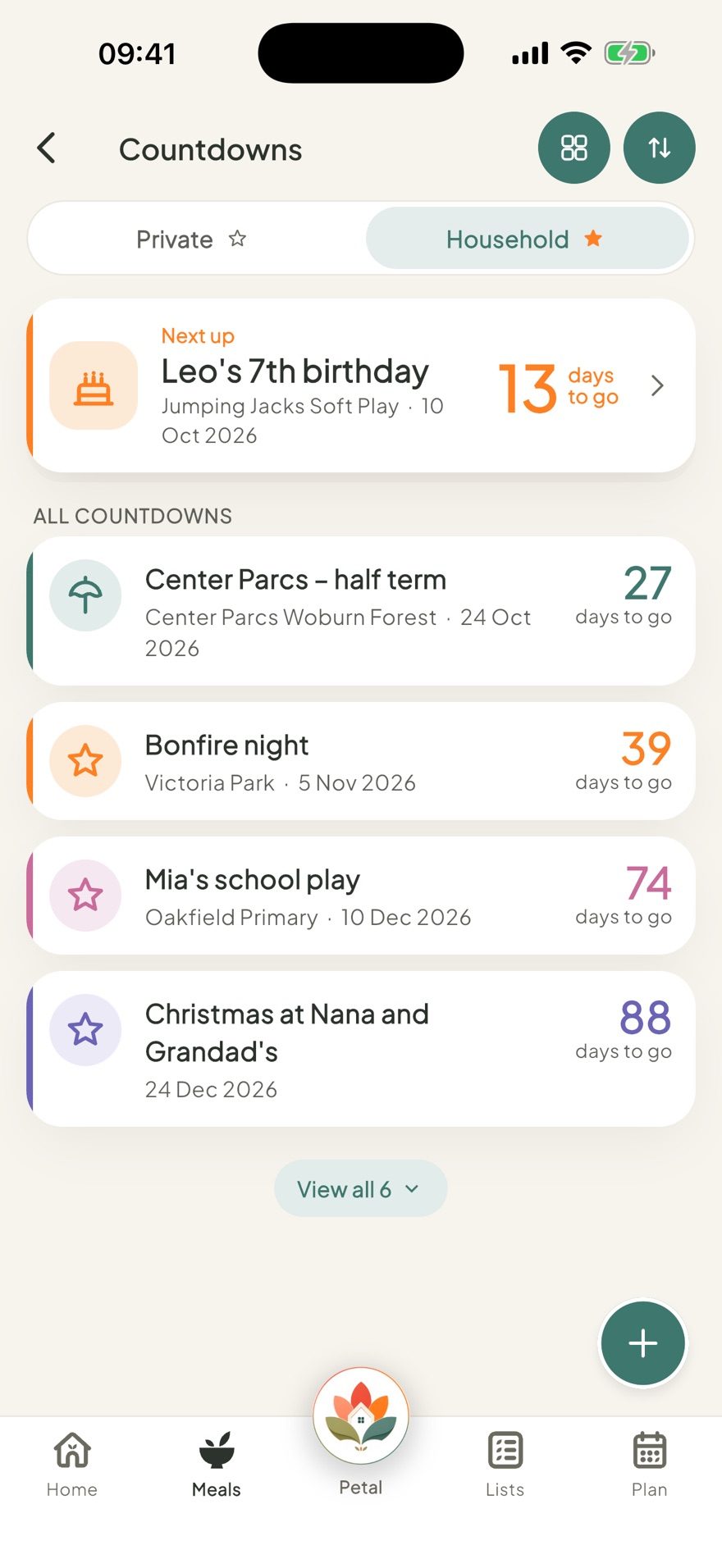
- Keep it Private, share it with the whole Household, or untick people to limit who sees it
- Set it up with no date yet for something you're planning, or a live days-to-go once it has one
- Tiles or a plain list view, sorted by soonest or your own order
What to use a family countdown for
Anything with a run-up worth planning for, really:
- A holiday or trip away
- A birthday or anniversary
- Christmas or another big family occasion
- Moving house
- A new baby due
- Starting a new school
- A family visit, party or wedding
- A big appointment or milestone
More than a number
A live days-to-go is the obvious bit: "13 days to go" today, "Today" on the day itself, "3 days ago" once it's passed. A countdown can also start with no date at all, working more like a home for something you're planning, the actual counting down starts once a date is added. Countdowns are part of Premium.
Everything for the occasion, in one place
A holiday countdown might hold a packing list, a passport-renewal reminder, and key dates for the deposit and the departure day itself. A birthday one might hold the present list, a cake reminder, and the party date as a key date. Whatever the occasion, link a list, reminders and calendar events to it once, and it's all there attached rather than scattered across separate parts of the app.
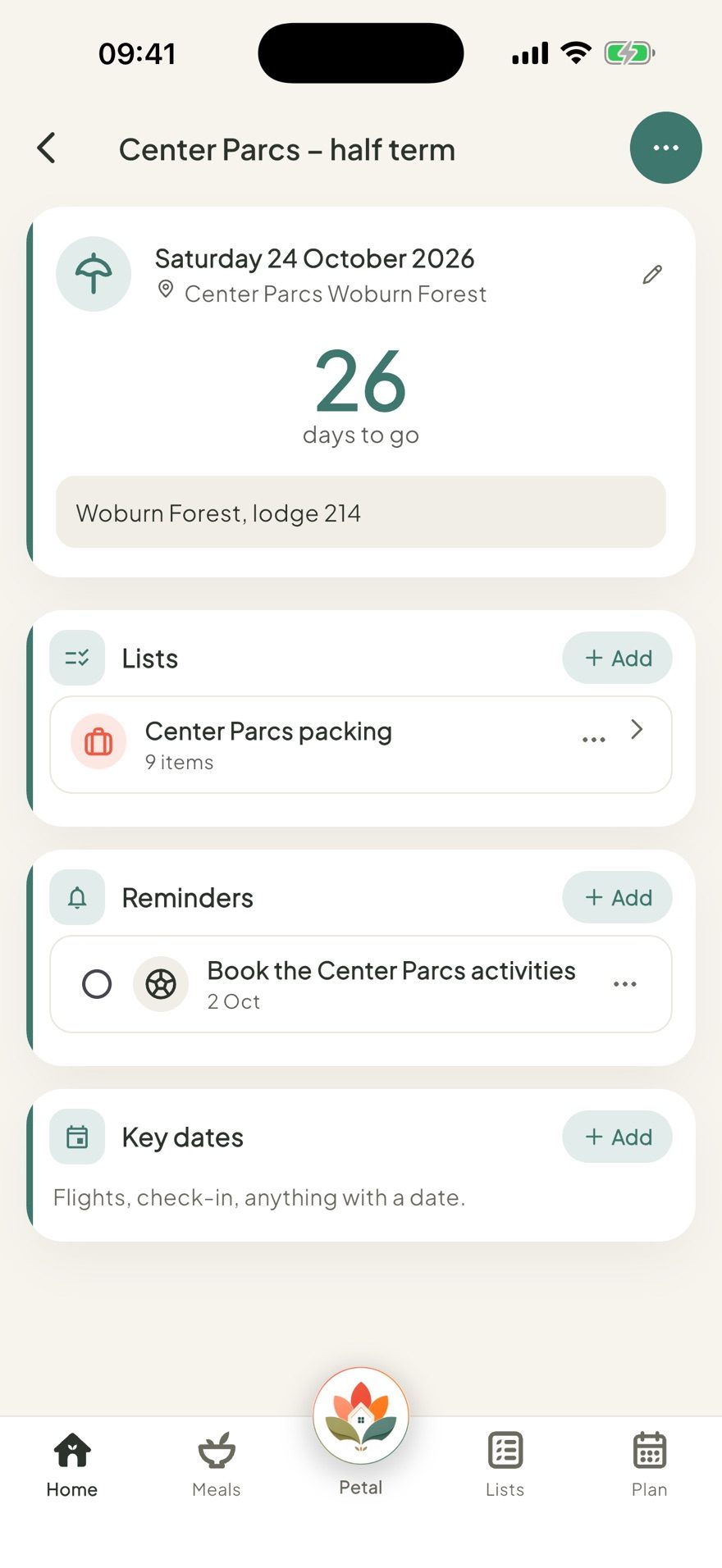
- A location with a pin on the map, plus your own colour and notes
- A "Remind me" option: the day before, a week before, or a custom number of days before
- A switch to add the date to your own calendar too
Share it with the right people
Keep a countdown Private, share it with the whole Household, or untick people to limit who sees it. A family holiday can be Household-wide; a surprise birthday plan can be shared with just the people arranging it.
Prefer a grid of tiles to scan, or a plain list to scroll? Both views exist, sortable by soonest or your own order, with a "Next up" card always keeping the closest one in view.
The point of a countdown at all
The days before something matters as much as the day itself, the anticipation, the getting ready, the small jobs that need doing along the way. A countdown that holds all of that, not just the number, means the run-up feels like part of the occasion instead of admin standing in front of it. One thing worth knowing: a countdown is tied to one date rather than repeating on its own, so next year's Christmas or birthday starts as a fresh one, while a calendar event can be set to repeat yearly if that suits better.
Petal Home makes Countdowns a proper little home for whatever your family's looking forward to, alongside the calendar, lists and reminders it already sits with.
Frequently asked questions
Do Petal Home countdowns repeat every year?
No, a countdown is tied to one date. Once it's passed, it moves to Been and gone, and a new one needs starting for next year. A calendar event, by contrast, can repeat yearly on its own.
Can I attach a packing list to a countdown?
Yes. A countdown can link to a list, reminders, and calendar events (shown as its Key dates), so everything for that trip or occasion lives in one place rather than scattered across the app.
Can a countdown have a location?
Yes, with a pin on a map, alongside a colour, notes, and an icon that's picked automatically from the title.
Does a countdown need a date?
Not necessarily. A countdown can also be set up with no date at all, working more like a project you're tracking than a day you're counting down to.
What can I use a family countdown for?
Anything with a run-up worth planning for: a holiday, a birthday, Christmas, moving house, a new baby, starting a new school, a family visit, a party or a wedding, or a big appointment.
What happens to my Countdowns if I don't have Premium?
Any you've already made stay visible, just locked, rather than disappearing. Creating a new one needs Premium.
One calm place for the whole family
Petal Home is being built to help families keep meals, lists, calendars and reminders in one calm shared space. If that sounds useful for your household, you can join the waitlist and we'll let you know when it launches.
Join the waitlist