 Petal Home
Home / Blog / The Sunday Reset: Plan the Family Week in 20 Minutes
The Sunday Reset: Plan the Family Week in 20 Minutes

A Sunday reset doesn't have to mean a spotless house and a colour-coded fridge. For a family, the useful version is twenty minutes, sitting down once, to look at the week ahead so Monday to Friday stop ambushing you. This version is about planning the family week, not cleaning the whole house, and it fits into a cup of tea.
The quick answer
A family Sunday reset is five quick checks, about twenty minutes in total:
- Week (5 minutes): who needs to be where, and when
- Meals (5 minutes): dinners that fit the busy nights
- Shop (3 minutes): one list, built from the meals
- Jobs (4 minutes): the things that go wrong if nobody remembers them
- One good thing (3 minutes): something to look forward to
Why twenty minutes on Sunday makes the week easier
A lot of weekday stress comes from finding things out too late: the club that moved, the form due tomorrow, the evening nobody's home to cook. A short look ahead, once a week, turns those surprises into things you already knew about. It works best at the same time each week, with whoever shares the running of the house, and with a firm stop at twenty minutes so it never becomes a chore of its own.
1. Week: who needs to be where (5 minutes)
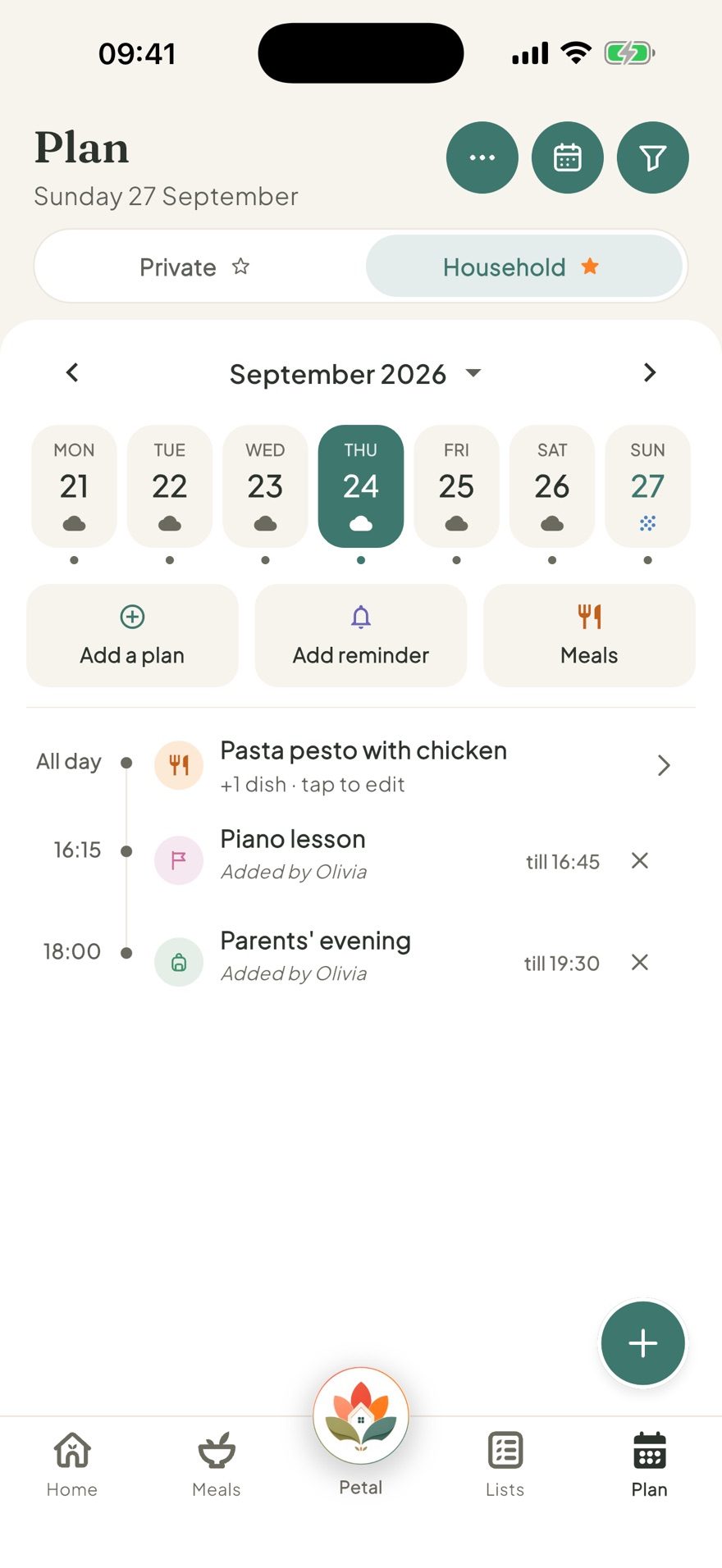
Go through the next seven days and look for the pinch points: late finishes, clubs, appointments, anyone away, and the nights two people need to be in two places. Scan the forecast for any day where the weather changes what needs packing or wearing. In Petal Home, the Plan screen shows the whole household's week, free, with the weather along the top (you can turn it off in Plan). With Premium, work calendars from Google, Outlook or Apple can sit in the same view, so a late meeting shows up next to swimming.
2. Meals: dinners that fit the week (5 minutes)
Now match dinners to what you just saw. The busiest nights get the quickest meal, or leftovers from the night before. The quieter nights get the dinner that takes a bit longer. You don't need seven new ideas: a handful of reliable favourites on rotation covers most weeks. In Petal Home, you plan the week's dinners on the free plan, and with Premium you can start from "Your usual week" or "Copy from last week" instead of a blank page.
3. Shop: one list, built from the meals (3 minutes)
The shopping list should come from the meal plan, not from walking around the kitchen trying to remember. Add each dinner's ingredients, then the everyday staples. In Petal Home, a recipe's ingredients go onto the shared shopping list in a couple of taps, and with Premium you can add the whole week's ingredients at once. Because the list is shared, whoever does the shopping has the same list as everyone else.
4. Jobs: the things nobody should have to remember (4 minutes)
These are the small things that cause the most friction when they're forgotten: recycling day, a form to sign, a bill to pay, a present to buy, sports clothes to wash. Give each one a day and a person, rather than leaving it floating. In Petal Home, a household reminder can repeat every week and be assigned to one person, so the nudge goes to their phone, and anything missed waits in Overdue instead of quietly disappearing.
5. One good thing (3 minutes)
End with something to look forward to: a movie night, a walk somewhere new, a visit, pizza on Friday. It sounds small, but it changes how the week feels. Put it on the calendar so it actually happens. For something further off, a countdown shared with the household shows everyone how many days are left (Premium).
The Sunday reset checklist
- Week: late finishes, clubs, appointments, anyone away, and any day the weather changes what to pack
- Meals: the quickest dinners on the busiest nights
- Shop: one list built from the meals, then the staples
- Jobs: every job given a day and a person
- One good thing: chosen, and on the calendar
Then stop, even if it isn't perfect. Twenty minutes is the point.
If you share the house with someone else, do the reset together, even if it's just the first five minutes. The week is far easier to share when you've both seen it.
Frequently asked questions
What is a Sunday reset?
A short weekly routine, usually on Sunday, where you look at the week ahead and get organised before it starts. For families, the most useful version covers the calendar, meals, shopping, jobs and one thing to look forward to.
How long should a Sunday reset take?
Twenty minutes is a useful target if you keep it to five quick checks. A firm finish time keeps it from turning into another chore.
What should a family Sunday reset include?
Who needs to be where each day, dinners that fit the busy nights, one shopping list built from those meals, the week's jobs each given a day and a person, and one good thing to look forward to.
Can the whole family see the plan?
Yes. In Petal Home, household plans, meals, the shopping list and household reminders are shared with everyone in the household, while private items stay private.
One calm place for the whole family
Petal Home is being built to help families keep meals, lists, calendars and reminders in one calm shared space. If that sounds useful for your household, you can join the waitlist and we'll let you know when it launches.
Join the waitlist