 Petal Home
Home / Blog / Meal Planning for Fussy Eaters & Mixed Diets
Meal Planning for Fussy Eaters & Mixed Diets

One vegetarian, one fussy seven-year-old, one person who'd eat curry every night. A lot of meal planning advice quietly assumes a household eats the same thing, which is exactly the households that give up on it fastest.
The quick answer
Meal planning for fussy eaters and mixed-diet households works best with strong filters and flexible portions, not five separate meal plans. In Petal Home, free to use:
- Pick a category first (breakfast, dinner, sweet treats and more), then filter by diet, main ingredient, what it's good for, and time
- Servings scale automatically on any library recipe, from 1 to 50, opening at your household's usual size
- Star your saved recipes to find them again, personal to you, free
- More than one meal a day is possible with Premium, breakfast, lunch, dinner and anything else
- A meal's ingredients add to the shopping list in a couple of taps
Filters that do the actual work of finding something
The real time cost in feeding a mixed-taste household isn't cooking, it's deciding. Start by picking a category, breakfast, dinner, sweet treats and more, then narrow it down with filters for diet, main ingredient, cooking time, or a situation like kid-friendly, budget, freezer-friendly, one-pot or batch-cook. All free to use.
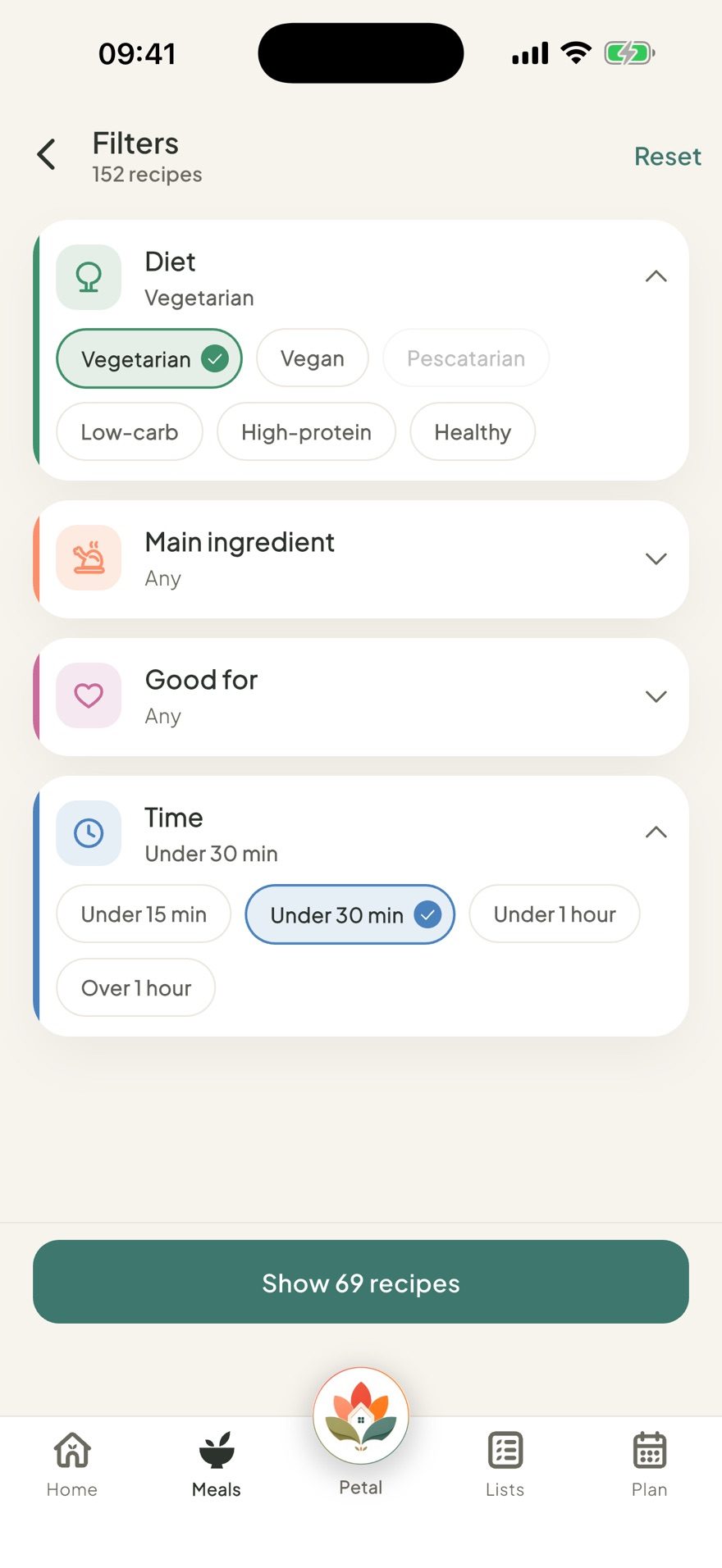
- Diet: vegetarian, vegan, pescatarian, low-carb, high-protein, healthy
- Main ingredient: chicken, beef, pork, lamb, fish, seafood, eggs, beans & pulses, tofu & veg, pasta, rice & grains
- Good for: kid-friendly, budget, freezer-friendly, one-pot, 5 ingredients, lunchbox, no-cook, batch-cook, fakeaway, leftovers
- Time: under 15, 30 or 60 minutes, or over an hour
A simple way to plan for mixed diets
Filters help you find something, but the fastest way to actually cut down the deciding is a rough method behind the scenes:
- Pick the shared base first: pasta, rice, wraps, potatoes, curry, a traybake
- Add one variation only where someone genuinely needs it
- Keep one or two reliable favourites in rotation each week
- Save the more adventurous meal for a night when there's time
- Plan portions for who's actually eating, not a fixed number
Cooking for the number you actually have
Servings adjust from 1 to 50 on any library recipe, and every ingredient amount scales automatically, free to use. It opens at your household's usual size if you've set one, or the recipe's own default otherwise, so a normal Tuesday doesn't need adjusting at all, it's there for the nights that genuinely differ, guests over, or a night it's just two of you. Scaling handles the numbers; filters and multiple meals handle the actual differences in what everyone eats.
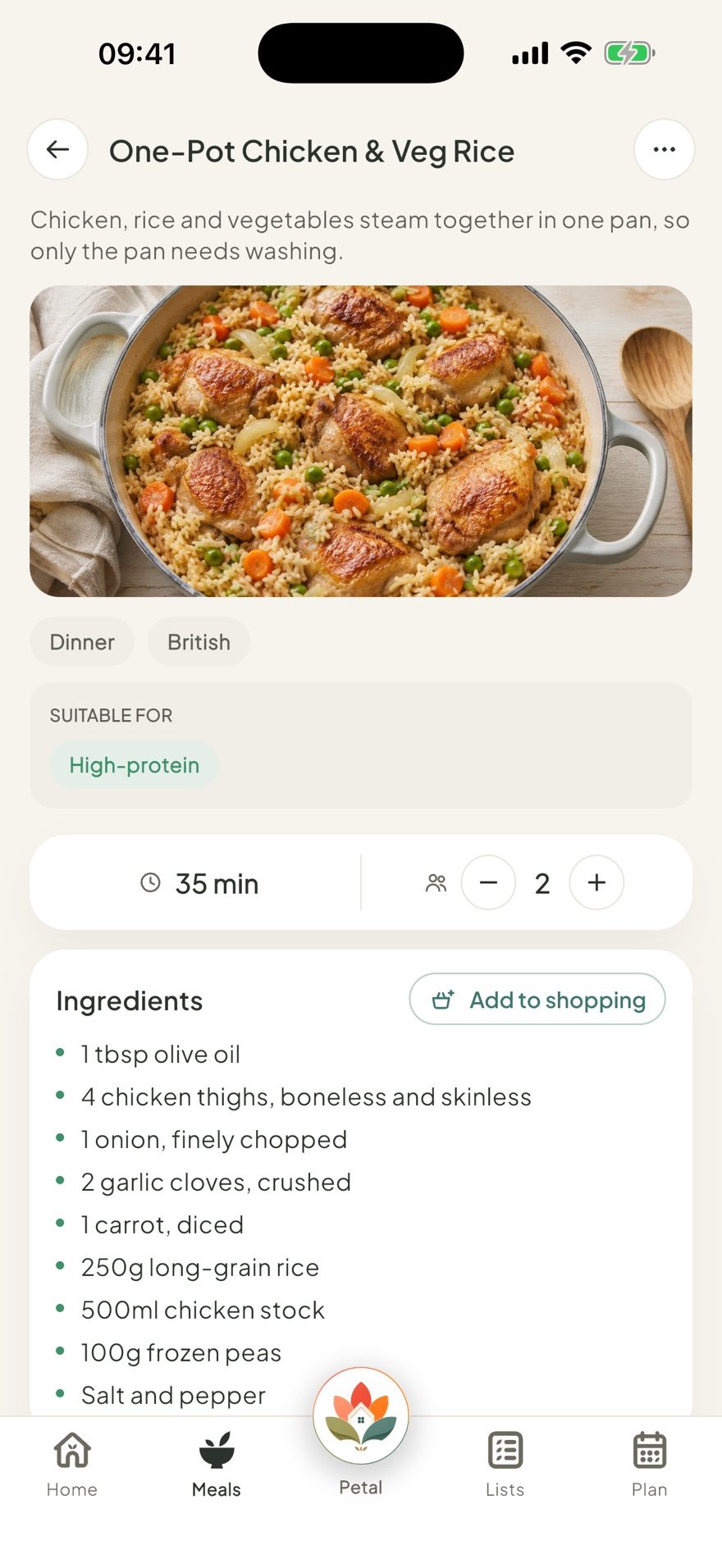
One plan the household chooses together
A day's plan lives at the household level, one shared plan everyone's cooking from, rather than a separate profile per person to maintain. With Premium, that stretches further when it needs to: more than one meal on the same day, breakfast, lunch, dinner and anything else, so a vegetarian option can sit alongside the main meal, covering a common mixed-diet situation without needing five parallel meal plans to do it.
Keep what worked
Star your favourite saved recipes and they're easy to find again, your stars are just yours. My recipes holds your own saved recipes, free up to 5, unlimited with Premium, and importing one from a link, when you've found it worth keeping elsewhere, is a Premium feature too.
With Premium, a usual week, copying last week's plan, and adding a whole week's ingredients to the shopping list in one go make repeat weeks easier, for when repetition is a feature, not a failure. Free plans can still add any single meal's ingredients to the shopping list in a couple of taps, just one meal at a time rather than a whole week together.
The actual goal isn't variety, it's less deciding
A mixed-taste household doesn't need infinite variety, it needs the deciding to take less out of whoever's doing it. Filters that match real constraints, a servings count that's already right, and a couple of taps from plan to shopping list, that's what turns "what's for dinner" from a nightly negotiation into something closer to a formality.
Petal Home brings meals, recipes and the shopping list they build into one calm shared space. More on the everyday version of this in our piece on the shared family shopping list that actually works.
Frequently asked questions
Can I plan a different meal for each person in the family?
Not per person. A day's meal belongs to the whole household, there's no per-person dietary profile or individual meal assignment. With Premium, more than one meal can be planned for the same day, breakfast, lunch, dinner and anything else, so a vegetarian option can sit alongside the main meal, which can cover a common mixed-diet setup without needing a separate plan for every person.
What recipe filters does Petal Home have?
Recipes are grouped into categories first (breakfast, dinner, sweet treats and more), then filtered by diet (vegetarian, vegan, pescatarian, low-carb, high-protein, healthy), main ingredient, a Good for category (kid-friendly, budget, freezer-friendly, one-pot, 5 ingredients, lunchbox, no-cook, batch-cook, fakeaway, leftovers), or time, all free to use.
Does adjusting servings change the ingredient amounts?
Yes, on library recipes. It adjusts from 1 to 50, opening at your household's usual size if you've set one, or the recipe's own default otherwise, and scales every ingredient amount automatically, free to use.
Can I save my favourite recipes?
Yes. Starring a recipe in My recipes is free and personal, your stars are just yours. Saving your own recipes there is free up to 5, with unlimited saves and importing a recipe from a link available with Premium.
How do I meal plan for a family that wants different things?
Start with meals that can share a common base, then vary only the part that needs changing. Keep a few reliable favourites in rotation, filter recipes by the household's actual constraints, and adjust portions to who's eating that night.
One calm place for the whole family
Petal Home is being built to help families keep meals, lists, calendars and reminders in one calm shared space. If that sounds useful for your household, you can join the waitlist and we'll let you know when it launches.
Join the waitlist