 Petal Home
Home / Blog / The shared family shopping list that works
The shared family shopping list that works

Most families already have a shopping list. What they don't have is a shopping list everybody uses. Those are two very different things, and the gap between them is where the forgotten milk lives.
The quick answer
The best family shopping list is one everyone can add to, that's on your phone in the shop, and that doesn't reset to empty every week. In Petal Home:
- Anyone in the household can add or tick off items, not just whoever does the shop
- It stays there week to week, so a household isn't rebuilding the same list from memory
- A separate budget list (Christmas, a party) can carry a total, and a budget for each person, with Premium
- Private lists exist alongside shared ones, for gifts and anything you'd rather keep to yourself
- A recipe's ingredients go straight to the shopping list in a couple of taps, grouped by aisle
Why the list usually falls apart
It's almost never the list itself. It's that one person ends up owning it.
Somebody becomes the keeper of the list, which quietly means they also become the person who notices things are running out. That's the real job, and it's invisible. Anyone can write "washing up liquid" down. Knowing it's nearly gone is the bit that takes up space in your head all week.
Once one person owns it, everyone else stops looking. They mention things instead. "We need bin bags" said over a hoover is not a list, it's a memory test, and the person being tested is already holding the rest of it.
The three places lists usually live
Paper on the fridge. Genuinely good at the noticing part, because it's where the food is. Useless in the shop, unless someone remembers to photograph it, which is one more job for the person already doing the jobs.
A notes app that only one person uses. Good in the shop, hopeless everywhere else. If nobody else is actually adding to it, you're still being told things instead.
The family WhatsApp. Everyone can add, which is a real improvement. But a chat isn't a list. Items scroll away under a conversation about football, and by Saturday you're scrolling back through four days of messages trying to work out whether anyone ever said "eggs".
What a list needs to actually work
Not much, as it turns out. It has to be somewhere everyone can add to, so noticing stops being one person's job. It has to be in your pocket in the shop. And it has to still be there next week, because a household buys roughly the same things over and over.
- Anyone in the house can add to it, not just whoever does the shop
- It's on everyone's phone, so it's there when you're standing in the aisle
- Ticking things off is quick enough to do one handed
- It doesn't vanish when the shop is done
That last one matters more than people expect. If the list resets to empty every week, you're rebuilding it from memory each time, which puts the mental load straight back where it started. Petal Home's grocery list also remembers which aisle you've put things in before, so next time it's already sorted the way you'll actually walk the shop.
Money, on the lists that need it
Not every list needs a budget. Your weekly shop is often the same staples most weeks. Other lists genuinely do: a Christmas list, a party you're all chipping into, anything with a total that matters.
Knowing you've spent forty pounds when you thought you had thirty is only helpful if you find out while there's still time to put something back. For bigger shops like Christmas, a separate budget list can track a total, and a budget for each person it applies to, with Premium, so each person has their own share and the total is still there underneath, tracked as you go rather than added up afterwards.
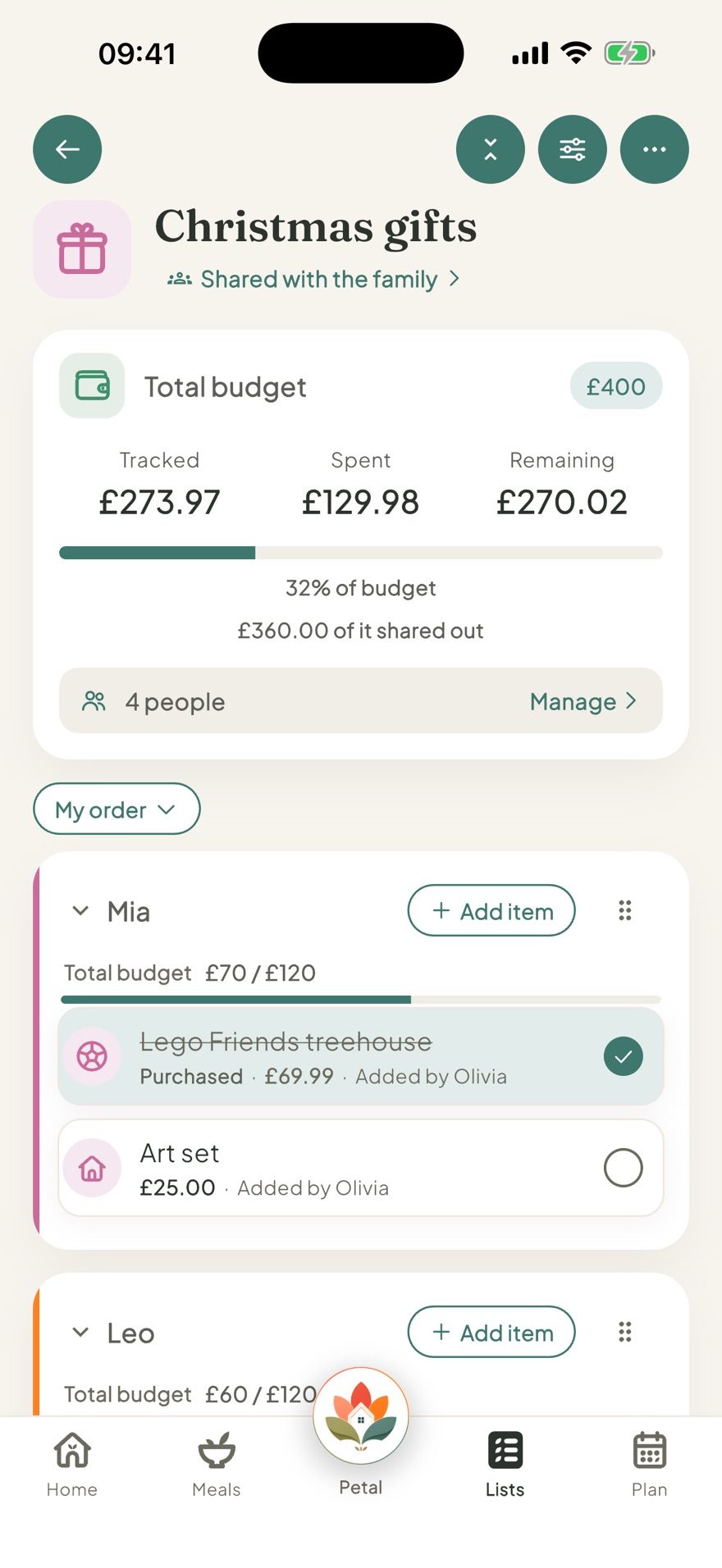
This is where Christmas and birthdays get easier too. A private gift list, for you only, can carry the same per-person budgets and prices, so it stays out of the household space where the recipient might wander past it.
Private lists and shared lists are not the same thing
Worth saying plainly, because shared and private lists solve different jobs, but they often end up living in different places.
Some lists genuinely belong to the whole house. The weekly shop, the things for the holiday, what's needed for the barbecue on Saturday. Everybody should see those, and everybody should be able to add.
Other lists are yours. Presents. The stuff you're quietly sorting out for somebody. Things you'd rather not explain. Those shouldn't have to sit in a shared space just because that's the only space the app offers.
Petal Home lets every list be one or the other, your choice, so you can have both without keeping two apps on your phone.
Let the meal plan write the list
If you already plan meals, even loosely, you're most of the way to a shopping list without realising it.
The reason it doesn't feel that way is that the plan and the list usually live apart. The plan is on the fridge or in your head, and the list is somewhere else, so you end up translating one into the other by hand every week. That translation is one of the boring bits, and one of the reasons meal planning can feel like more admin than it saves.
When the two sit in the same place, it's a couple of taps instead of a translation. Add a single recipe's ingredients to the shopping list straight from the meal, grouped by aisle for you. With Premium, do the whole week in one go instead: pick which meals, add all their ingredients together, and anything already on the list or repeated across meals is combined rather than doubled up. Either way, you're reviewing a list somebody else has mostly built, not starting from nothing. That's the difference between meal planning being a nice idea and meal planning being something you still do in November.
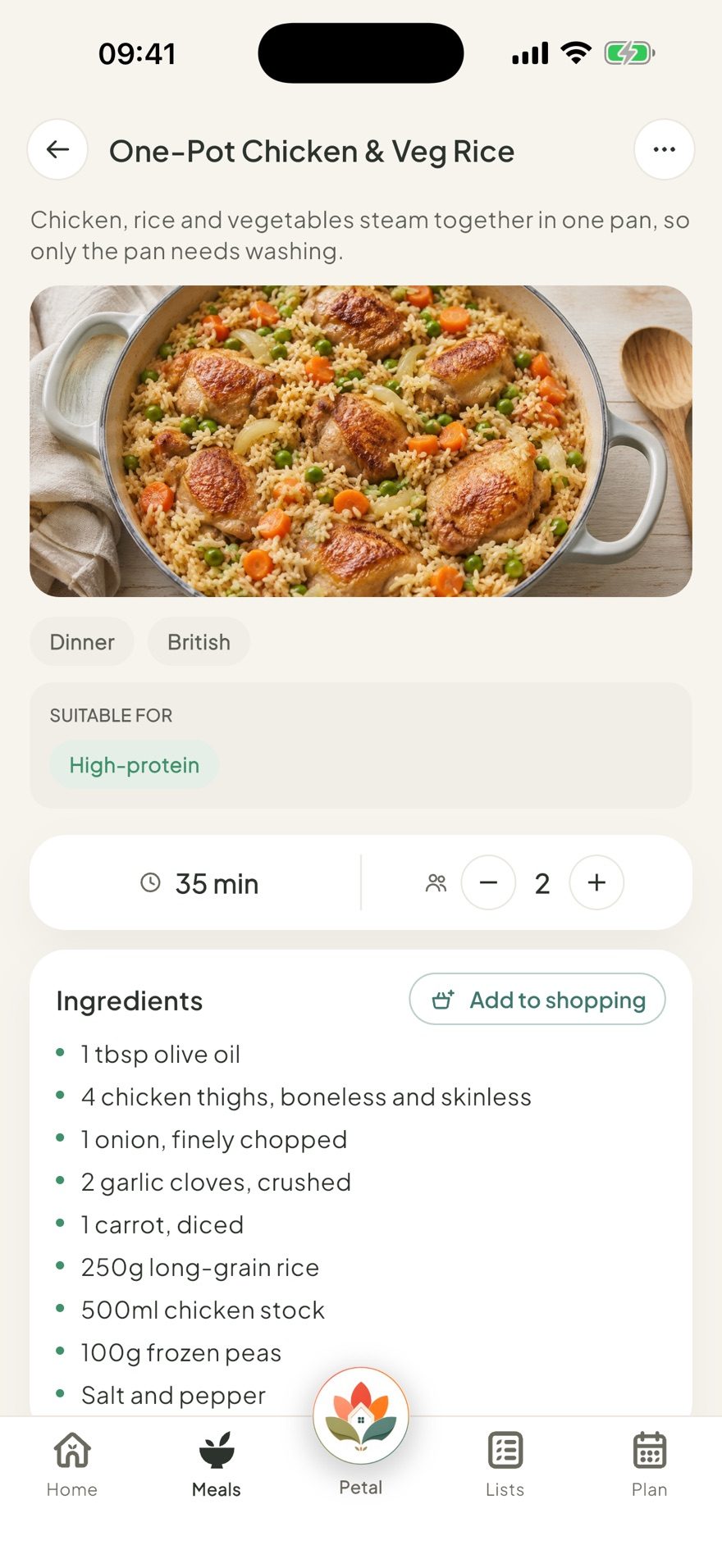
There's more on how we're approaching that on the meal planning page.
Start smaller than you think
If you want to fix this in your house, don't roll out a system. Big new systems have a habit of getting abandoned in a fortnight.
Pick one list, the weekly shop, and get everyone adding to that one thing. Nothing else. Once people are in the habit of adding rather than mentioning, the rest follows on its own, and the person who used to keep it all in their head gets a bit of that space back.
Petal Home brings exactly that together: shared lists the whole household can add to, private ones that stay yours, budgets where they're useful, and meals and shopping that talk to each other. It's the same thinking behind sharing the housework without the nagging: make the invisible work visible, then let something else do the reminding.
Frequently asked questions
What makes a shared shopping list actually work?
It has to be somewhere everyone can add to, so noticing what's running out stops being one person's job. It has to be in your pocket in the shop, and it has to still be there next week rather than resetting to empty, because many regular household items come up again and again.
Can a shopping list have a budget?
Not the everyday grocery list, but a separate budget list, like a Christmas gift list or a party shop, can carry a total with Premium, and a budget for each person it applies to, so each person has their own share and the total is still there underneath.
Can I keep a gift list private from my family?
Yes. Any list can be private, for you only, including the same per-person budgets and prices a shared list can have, so it stays out of the household space where the recipient might see it.
Does meal planning automatically create a shopping list?
Not automatically. Add a single recipe's ingredients to the shopping list in a couple of taps, grouped by aisle. With Premium, add a whole week's planned meals at once instead, and anything already on the list is combined rather than duplicated.
One calm place for the whole family
Petal Home is being built to help families keep meals, lists, calendars and reminders in one calm shared space. If that sounds useful for your household, you can join the waitlist and we'll let you know when it launches.
Join the waitlist